Rain Viewer: Weather Radar Map
- 4.3
- Rating
- 1.00M
- Installs
- Free
- Price

 Analysis by App-foxy
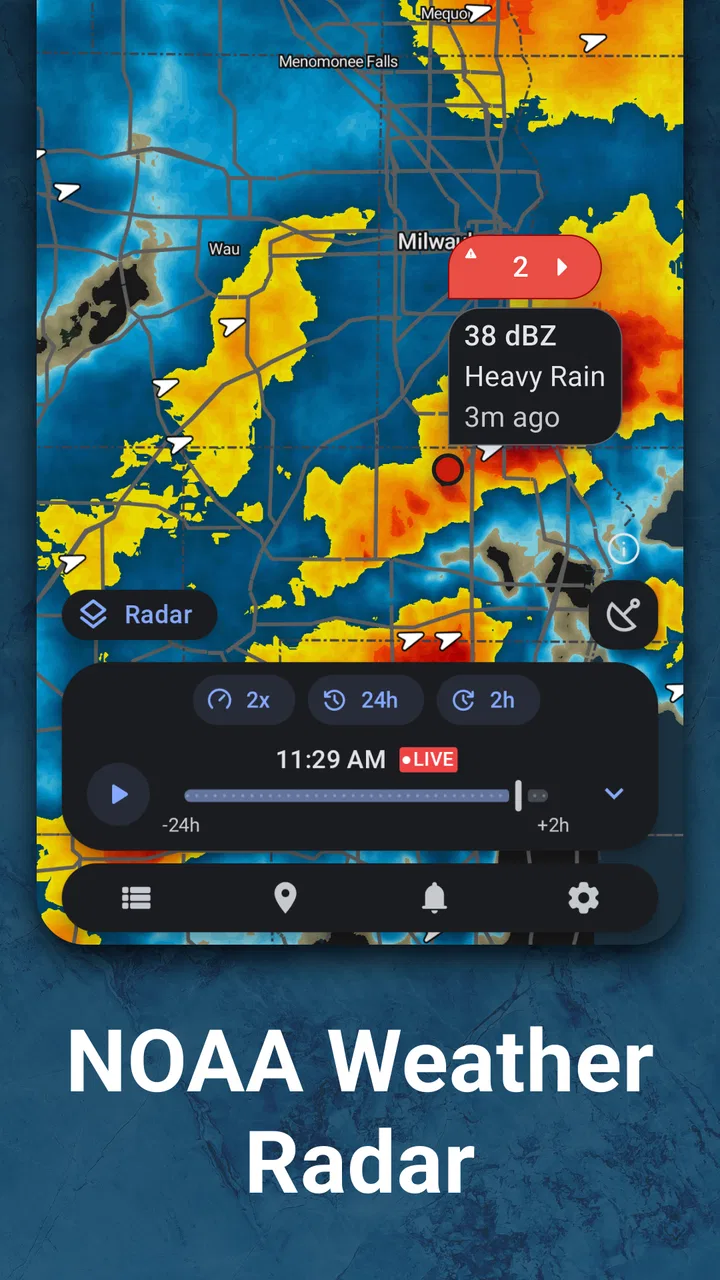
I tend to keep a weather app open for one simple reason: the forecast can tell me what is expected, but a radar view helps me decide what is happening right now. Rain Viewer takes that second job seriously. It is a weather app from MeteoLab built around a live radar map, rain alerts, local forecasts, and hurricane tracking. After using it as a practical day-to-day tool, I found it most useful when I needed to make a short-term decision rather than plan an entire week.
The app is free to install and is suitable for everyone, which makes it easy to try without committing to a subscription first. Its current version is 7.14, and it runs on Android 8.0 or later. The app has passed the one-million-install mark and holds a 4.4 average from roughly 147 thousand ratings, so it is clearly more established than a small experimental weather utility. That popularity does not make every forecast perfect, but it does suggest that the basic radar workflow works for a broad range of users.
How I use the radar during an ordinary day
My normal routine starts with the map, not the hourly forecast. I open the app, select my location, and look at the movement of rain around me. The most useful question is rarely “Will it rain today?” It is usually “Will the rain reach me before I leave, and how long might the difficult part last?” A radar animation gives me a better starting point for that decision than a single weather icon.
You May Also Like

 Blood Strike: 2.5 Anniversary
Blood Strike’s Loadouts Turn Every Drop Into a Tactical Gamble
A close look at Blood Strike’s custom loadouts: how fast access to signature weapons reshapes its battle royale rhythm, rewards preparation, and narrows the gap between fights.

 Pandora - Music & Podcasts
Pandora’s Music Is Easy to Start, but Harder to Recover
Pandora’s strength is its low-effort path from a seed to a station. Its weak spot is how much confidence it asks you to place in connection, setup, and quiet recovery.

 8 Ball Pool
 Is Built on Rivalries, Rematches, and Routine
A close look at the rivalries, rematches, shared routines, and unanswered safety questions that turn a quick pool match into a persistent mobile community.

 Samsung Music
’s Quiet Strength Is Playing What You Already Own
Its reach comes less from spectacle than from dependable access to a personal library. That simplicity is both the app’s strongest retention engine and its ceiling.

 AccuWeather: Weather Radar
AccuWeather Review: A Quick, Clear Forecast for Everyday Decisions
For everyday plans, the best forecast is the one you can understand quickly. AccuWeather makes rain timing, radar, and local conditions easy to act on, with a few trade-offs.

 Hill Climb Racing
Why Hill Climb Racing Still Turns Crashes Into One More Run
A tiny car, a bumpy hill and one more upgrade: Hill Climb Racing keeps resurfacing because its simple chaos makes every near-miss feel personal.
More From Our News Desk



For example, imagine I am preparing to walk to a station in the afternoon. A general forecast may show rain during that hour, but the radar can reveal whether a narrow band is moving away, whether a larger area is approaching, or whether scattered showers are likely to remain unpredictable. I can then decide whether to leave immediately, wait a little, or take waterproof clothing. That is a small use case, but it is exactly where this app feels more practical than a standard forecast screen.
The map is also useful when conditions are changing quickly. I use the animation to judge direction and continuity instead of reacting to one bright patch of color. A single frame can be misleading: it may show rain nearby without making clear whether it is moving toward my area or passing to one side. Watching the sequence gives the map context, although it still requires common sense because radar imagery is not a guarantee that every street will receive the same rain.
That distinction matters. Rain Viewer is strongest as a short-range observation tool. I would not treat it as a replacement for local emergency information, official warnings, or a careful long-range forecast. Its radar can help me see the present pattern, but it cannot remove the uncertainty created by hills, buildings, changing wind, weak showers, or gaps between radar coverage areas.
The best starting point is a repeatable map check
I get more value when I check the same things in the same order. First I confirm that the map is centered on the place that matters, especially if I have recently searched for another location. Then I look at the latest radar frame, play the animation, and compare the movement with the forecast period I care about. Finally, I check whether the app shows an alert that changes the seriousness of the situation.
This habit prevents a common mistake: opening a weather app, seeing a dramatic color on the map, and immediately assuming the weather is about to become severe. The animation is more informative than a frozen image, while the local forecast provides broader context. Used together, they make the app feel less like a decorative map and more like a decision tool.
I also avoid checking the radar too far ahead and expecting precise timing. A moving rain area may look as if it will arrive at a particular minute, but small changes in speed and direction can make that estimate unreliable. I use the map to choose between practical options, such as walking now or waiting, rather than to promise myself a perfectly dry interval.
Settings that deserve attention before relying on alerts
Rain alerts are one of the reasons to use this app instead of opening a radar manually every time. Still, I would not enable every notification without thinking about how I actually live. If I commute, exercise outdoors, or care for children, alerts about approaching rain may be genuinely useful. If I live in a region with frequent brief showers, constant notifications can become background noise and make the important ones easier to ignore.
I recommend checking the notification choices during the first setup and deciding which locations deserve attention. A home location may be enough for everyday use, while a workplace or regular travel destination can be more useful for people who move around the city. The important point is to keep the alert system focused. A smaller number of relevant warnings is easier to act on than a stream of messages about every passing shower.
Location accuracy is another setting-related consideration. For a quick glance at nearby rain, an approximate area can be sufficient. For alerts intended to guide a specific walk or outdoor appointment, I prefer confirming that the selected place is correct. A radar map can be visually convincing even when it is centered on the wrong neighborhood, so checking the location label is a simple step that prevents avoidable mistakes.
The app includes in-app purchases ranging from $4.99 to $39.99 per item. I would use the free experience first and only consider paying after deciding that the extra options fit my routine. The right question is not whether a paid feature sounds useful in isolation, but whether it saves me repeated effort every week. Someone who checks rain once or twice may never need to spend anything; a frequent outdoor user may value a more complete workflow if the available upgrade matches that need.
The age rating is Everyone, which fits the straightforward nature of the app. I would still explain notification choices to younger users and avoid treating any alert as a substitute for an adult’s judgment during dangerous weather. The simple interface makes the app approachable, but weather decisions can still have serious consequences when storms or hurricanes are involved.
Shortcuts and faster patterns for regular users
Experienced use is less about discovering a secret button and more about reducing repeated decisions. I keep the app for two distinct jobs: checking immediate rain movement and checking broader weather context. When I only need to know whether a shower is approaching, I go straight to the radar and avoid spending time reading every forecast detail. When I am planning an outdoor activity later in the day, I use the local forecast first and then consult the map to see whether the current pattern supports that outlook.
This separation makes the app faster. The radar answers “what is moving now?” while the local forecast helps answer “what kind of day should I expect?” Confusing those jobs is one reason people sometimes become disappointed with weather apps. A radar image is not designed to replace every forecast period, and a forecast icon is not designed to show the precise shape of a rain band.
I also find it helpful to check the map immediately before leaving and once more if the trip is long enough for conditions to change. That is more sensible than watching it continuously. Constant refreshing does not necessarily improve the decision, particularly when the weather system is slow or scattered. A quick check at the decision point gives me current information without turning the app into a distraction.
For outdoor plans, I create a simple rule for myself: if the radar shows a compact area moving directly toward the route, I delay or change the route; if the pattern is broken and moving away, I may continue but carry protection; if the map and forecast disagree, I choose the safer option and allow extra time. This is not an app feature, but it is the kind of repeatable habit that makes the app more useful than casual map browsing.
The hurricane tracker deserves a different approach. I would use it to follow the broad position and development of a tropical system, not to make evacuation or emergency decisions by myself. For those situations, official agencies and local authorities should take priority. The tracker can help me organize what I am seeing and understand the general movement, but it should sit alongside authoritative guidance rather than replace it.
Where the app is stronger than ordinary forecast apps
Many standard weather apps place the current temperature and a row of hourly icons at the center of the experience. That is convenient for routine planning, but it can hide the uncertainty of short rain events. Rain Viewer gives the radar a more prominent role, which is valuable when the difference between leaving now and leaving in twenty minutes matters.
I especially prefer it for commuting, cycling, walking, photography, gardening, and outdoor work. In these situations, a broad daily forecast is often too blunt. A person deciding whether to start painting a fence, take a bike ride, or carry equipment across town benefits from seeing the rain pattern rather than relying only on a percentage or icon.
The app also has a clearer purpose than many overloaded weather products. It is not trying to be a news feed, a lifestyle dashboard, and a general information portal at the same time. Its radar-centered design helps me reach the relevant information quickly. That focus is the main reason I would recommend it beside, rather than necessarily instead of, a conventional weather app.
Important limits before you make it your only weather source
The first limitation is that radar interpretation takes a little practice. Colors and animation can look authoritative, but they do not automatically explain intensity at ground level, exact arrival time, or whether a shower will weaken before reaching me. New users may need a few checks to learn the difference between a nearby passing cell and a larger system that deserves more caution.
The second limitation is that radar is not equally informative in every environment. Coverage, terrain, distance from the radar source, and the type of precipitation can affect what appears on the map. Light drizzle, snow, hail, and rapidly developing storms may not behave in a way that makes a simple visual forecast reliable. If I need a detailed mountain forecast, marine information, aviation planning, or official severe-weather instructions, I would choose a specialized source instead.
There is also a practical trade-off between alerts and attention. Notifications are helpful only when they arrive at a useful time and refer to a place I care about. If my schedule changes constantly, a fixed alert location may be less useful than opening the map manually. Likewise, someone who lives in a dry climate may not gain much from a radar-first app, while someone in a region with frequent changing showers may appreciate it every day.
The paid options may also create a decision point for users who expect every feature to be included at no cost. Since the app is free to start, I see that as reasonable, but I would still test the basic workflow before buying. The app should earn a place in my routine through accurate, understandable short-term information, not through the assumption that a purchase will solve every forecasting limitation.
Who should use Rain Viewer, and who should look elsewhere?
I would recommend it to anyone who regularly asks whether rain is approaching right now. Commuters, runners, cyclists, parents planning a walk, outdoor workers, and travelers moving between nearby places are the clearest audience. It is also a good companion for people who already have a favorite general forecast app but want a more visual way to judge immediate rain movement.
I would be more cautious about recommending it as the only app to someone who wants detailed climate information, extensive long-range planning, or highly specialized forecasts. A person planning a multi-day hike may need mountain-specific information. Someone following a dangerous tropical system should rely on official warnings. A user who only wants tomorrow’s temperature and a simple morning notification may find a basic phone weather app quicker.
For privacy-conscious users, the practical question is whether they are comfortable using a location-centered weather service and whether they prefer selecting places manually. I do not need to keep the app open all day to benefit from it. A deliberate check of the relevant location is often enough, and that approach also keeps the experience calmer and more focused.
My final assessment after building a routine around it
Rain Viewer is a focused weather app that earns its place through the radar workflow rather than through a long list of unrelated extras. I like it because it helps me make immediate choices: leave now, wait, change the route, or carry protection. The combination of a live map, local forecast, rain alerts, and hurricane tracking covers more than a simple radar viewer, while still keeping short-term weather at the center.
My strongest advice is to use the animation, confirm the location, tune alerts to real needs, and treat the map as evidence rather than a promise. Those four habits make the app more useful and reduce the risk of overinterpreting a colorful screen. I would also keep an official weather source available for severe conditions and specialized planning.
With a 4.4 average and more than a million installs, the app has become a credible choice in the weather category, and its free entry point makes testing straightforward. MeteoLab has kept the product centered on a clear problem instead of making it feel like a general-purpose information hub. My verdict is simple: choose Rain Viewer if immediate rain movement affects your decisions; skip it if you only need a basic daily forecast or specialized official guidance.
FAQs for Rain Viewer: Weather Radar Map
01What features does Rain Viewer: Weather Radar Map offer?
Rain Viewer provides a comprehensive radar map to track weather patterns in real-time. It includes features like precipitation forecasts, storm tracking, and customizable alerts. The app covers multiple regions, offering global radar coverage, and provides detailed weather updates with high-resolution images to help users plan their day effectively.
02Is Rain Viewer: Weather Radar Map free to use?
Yes, Rain Viewer offers a free version with basic features. However, there is also a premium version available through in-app purchases. The premium version includes additional features such as extended radar history and an ad-free experience. This allows users to choose the version that best suits their needs.
03How accurate is the weather data provided by Rain Viewer?
Rain Viewer sources its data from a network of weather services, ensuring high accuracy. The app updates radar images every 5 to 10 minutes, providing users with the most current information. However, like all weather apps, it may occasionally have discrepancies due to rapid weather changes.
04Can I customize notifications in Rain Viewer: Weather Radar Map?
Yes, users can customize notifications to receive alerts for specific weather conditions. You can set up alerts for rain, storms, and other severe weather events. The app allows for location-based alerts, ensuring you only receive notifications relevant to your area, which can be adjusted in the settings.
05Does Rain Viewer: Weather Radar Map work offline?
Rain Viewer requires an internet connection to update and display radar images and forecasts. While the app itself can be accessed offline, the data will not refresh until you're back online. For the most accurate and up-to-date information, it's recommended to use the app with a stable internet connection.
Pros
- Comprehensive radar coverage worldwide.
- Real-time weather updates and alerts.
- User-friendly interface and design.
- Customizable notifications for specific areas.
- Supports multiple map layers for detailed views.
Cons
- Limited offline functionality.
- Ad-supported free version can be distracting.
- Occasional map loading delays.
- Premium features require subscription.
- High battery usage during continuous updates.

Rain Viewer: Weather Radar Map
Gallery